
Ext4+Java构建Web应用程序后台经典界面
在我以前写的一篇文章ExtJS4+Servlet/Struts2+JSON+accordion布局动态Ext.tree.Panel菜单,大家都对Ext.tree.Panel组件和Ext.tab.Panel组件相结合起来比较困惑。对于Ext.tree.Panel的异步加载也有问题。写这篇文章分享我对Ext开发的一些做法和认识。谈谈自己如何构建Ext应用框架的,下面让大家看看效果图:
- 这个图的左边是一个树,这个树的结构是从数据库通过异步的方式拿出来的,数据格式是JSON。什么异步呢?就是加载父节点而不加载子节点,需要的时候再去加载子节点,从而节省数资源。
- 图的上面是一个很简单的应用名称,下面有个工具栏,展示登录人,系统时间和退出按钮等一些组件。
- 图的右边是一个标签页,这个地方主要是用户的操作界面,这里是树控件的一些数据来生成标签页的。
这个项目是从我的那篇文章中扩展过来的,增加的数据库的部分。数据库是MYSQL,数据库很简单就只是一张表,表名是resource:
这里面字段比较简单,
- id:主键ID
- component:一个Ext扩展类或者是调用的页面,说白了就是你要让用户看到的内容
- descriptio:描述,与业务关键,纯属冗余
- iconCls:树节点显示的图标
- text:树节点显示的名称
- sort:排序用的
- type:资源的类型,COMPONENT/URL,是组件的形式或者是URL
- parent_id:父节点
- leaf:是否是根节点
这个是数据表结构,现在我们看下JS实现代码:
Ext.Loader.setConfig({
	enabled : true
});

Ext.Loader.setPath({
	'Ext.ux' : 'ext4/ux',
	'Ext.app' : 'ext4/app'
});

Ext.require(['Ext.app.Portlet', 'Ext.app.PortalColumn', 'Ext.app.PortalPanel',
		'Ext.app.PortalDropZone', 'Ext.ux.TabReorderer',
		'Ext.ux.TabCloseMenu']);
这里配置Ext动态加载功能,并引入了一些需要的Ext类,如果大家对Ext动态加载不怎么了解,大家可以去看下黄灯桥老师的文章: 在应用中使用Ext Loader,这里对Ext的动态加载用详细的介绍,我在这里就不在赘述。下面看下应用的整体布局,整个框架一共三个组件,上面的为:title,左边的为:tree,右边的为:tab,下面看看这些组件的实现,先看title:
	var title = Ext.create("Ext.panel.Panel", {
						height : 80,
						html : '业务基础平台',
						region : 'north',
						split : true,
						bbar : [{
							iconCls : 'icon-user',
							text : '管理员'
						},'-',{
							text : Ext.Date.format(new Date(),'Y年m月d日')
						},'->',{
							text : '退出',
							iconCls : 'icon-logout'
						}],
						bodyStyle : 'backgroud-color:#99bbe8;line-height : 50px;padding-left:20px;font-size:22px;color:#000000;font-family:黑体;font-weight:bolder;' +
								'background: -webkit-gradient(linear, left top, left bottom, color-stop(0%, rgba(153,187, 232, 0.4) ), color-stop(50%, rgba(153, 187, 232, 1) ),color-stop(0%, rgba(153, 187, 232, 0.4) ) )'
					});
这个是title,这个组件很简单,主要是显示了“业务基础平台”的系统名称,并配置了相关的样式。并定义了一个bbar,用于显示用户名,当前时间和退出按钮等信息。下面看tab:
var tab = Ext.create('Ext.tab.Panel', {
						activeTab : 0,
						enableTabScroll : true,
						animScroll : true,
						border : true,
						autoScroll : true,
						region : 'center',
						split : true,
						items : [{
							iconCls : 'icon-activity',
							title : '平台首页',
							xtype:'portalpanel',
							layout:'column',
							items : [{
									xtype : 'portalcolumn',
									columnWidth : 0.7,
					                items:[{ title: '新闻动态',height : 150,iconCls : 'icon-news' },
					                	{title: '最新通知',height : 150, iconCls : 'icon-notice' },
					                	{title: '业绩报表',height : 150, iconCls : 'icon-chart'}]
					            },{
					            	xtype : 'portalcolumn',
					            	columnWidth : 0.3,
					                items:[{ title: '功能链接', height : 150, iconCls : 'icon-link'},
					                	{title: '待办事项',height : 150,iconCls : 'icon-note' },
					                	{title: '邮件列表', height : 150,iconCls : 'icon-email-list'}]
					            }]
						}],
						plugins: [Ext.create('Ext.ux.TabReorderer'),
		        		  Ext.create('Ext.ux.TabCloseMenu',{
		        		  	closeTabText: '关闭面板',
		        		  	closeOthersTabsText: '关闭其他',
		        		  	closeAllTabsText: '关闭所有'
		        		  })]
					});
这里我们定义了一个tabpanel,一些很普通的配置,大家可以去看官方文档。这个代码里面有关键的两个部分:
- 我们定义了一个portalpanel,这个是Ext的一个扩展应用,这个是可以允许用户进行排版的,大家可以看看效果:
- 还有两个插件:Ext.ux.TabReorderer,这个是用来标签拖动的,Ext.ux.TabCloseMenu,这个是标签的右键菜单,用来关闭标签页。
下面看看左边树面板的实现,大家可能对这段代码比较熟悉,关键是accordion布局,就不多做解释:
var tree = Ext.create("Ext.panel.Panel", {
						region : 'west',
						title : "系统菜单",
						width : 250,
						iconCls : "icon-tree",
						autoScroll : false,
						layout : 'accordion',
						collapsible : true,
						layoutConfig : {
							animate : true
						},
						split : true
					});
下面我们将这些组件放在viewport组件里面,展示出来:
			Ext.create('Ext.container.Viewport',{
				layout : 'border',
				items : [title,tab,tree],
				listeners : {
					afterrender : function(){
						Ext.getBody().mask('正在加载系统菜单....');
						ajax({
							url : "app",// 获取面板的地址
							params : {
								action : "list"
							},
							callback : addTree
						});
					}
				}
			});
通过这段代码的实现,将组件放入到页面当中,这里可能大家需要看看ext的布局方面的知识。大家注意了,在这段代码中我们注册了一个afterender的事件,这个事件的主要作用是,在组件渲染完成之后,去获取系统菜单,ajax方法就是发送一个请求到后台获得树面板的数据,下面我们看看服务器端的实现,服务器端是用java写的:
	public void doGet(HttpServletRequest request, HttpServletResponse response)
			throws ServletException, IOException {
		this.doPost(request, response);
	}

	public void doPost(HttpServletRequest request, HttpServletResponse response)
			throws ServletException, IOException {
		String action = request.getParameter("action");
		initHeader(response);
		if (action.equals("list")) {// 获取属面板列表
			renderText(this.getTreePanelList(), response);
		} else if (action.equals("node")) {
			renderText(this.getTreeNodeList(request.getParameter("id")),
					response);
		}
	}

	public String getTreePanelList() {
		String sql = "select  t.id, t.text, t.component, "
				+ " t.description, t.type, t.iconCls, t.sort "
				+ " from resource t where t.parent_id is null";
		return BaseDAO.findBySql(sql).toString();
	}

	public String getTreeNodeList(String id) {
		String sql = "select  t.id, t.text, t.component, "
				+ " t.description, t.type, t.iconCls, t.sort,t.leaf "
				+ " from resource t where t.parent_id = '" + id + "'";
		return BaseDAO.findBySql(sql).toString();
	}
这段代码的实现的是,通过参数判断是获取树面板还是树节点,BaseDAO.findBySql方法将返回的结果集转换成一个List<JSONObject>对象,获得数据后发送到页面,这里面有两个获得数据的方法:
- getTreePanelList,获取树面板,这里的逻辑判断是没有父节点的数据
- getTreeNodeList,获取树节点,通过父节点查找子节点
在ajax方法中注册了一个回调函数,addTree,用于添加树面板:
function addTree(data) {
				Ext.getBody().unmask();
				for (var i = 0; i < data.length; i++) {
					tree.add(Ext.create("Ext.tree.Panel", {
								title : data[i].text,
								iconCls : data[i].iconCls,
								//useArrows: true,
								autoScroll : true,
								rootVisible : false,
								viewConfig : {
									loadingText : "正在加载..."
								},
								store : createStore(data[i].id),
								listeners : {
									afterlayout : function() {
										if (this.getView().el) {
											var el = this.getView().el;
											var table = el
													.down("table.x-grid-table");
											if (table) {
												table.setWidth(el.getWidth());
											}
										}
									},
									itemclick : function(view,node){
										if (node.isLeaf()) {
											if(node.data.type === 'URL'){
												var panel = Ext.create('Ext.panel.Panel',{
													title : node.data.text,
													closable : true,
													iconCls : 'icon-activity',
													html : '<iframe width="100%" height="100%" frameborder="0" src="http://www.baidu.com"></iframe>'
												});
												tab.add(panel);
												tab.setActiveTab(panel);
											}else if(node.data.type === 'COMPONENT'){
												var panel = Ext.create(node.data.component,{
													title : node.data.text,
													closable : true,
													iconCls : 'icon-activity'
												});
												tab.add(panel);
												tab.setActiveTab(panel);
											}
										}
									}
								}
							}));
					tree.doLayout();

				}
			}
			var model = Ext.define("TreeModel", { // 定义树节点数据模型
				extend : "Ext.data.Model",
				fields : [{name : "id",type : "string"},
						{name : "text",type : "string"},
						{name : "iconCls",type : "string"},
						{name : "leaf",type : "boolean"},
						{name : 'type'},
						{name : 'component'}]
			});
			var createStore = function(id) { // 创建树面板数据源
				var me = this;
				return Ext.create("Ext.data.TreeStore", {
							defaultRootId : id, // 默认的根节点id
							model : model,
							proxy : {
								type : "ajax", // 获取方式
								url : "app?action=node" // 获取树节点的地址
							},
							clearOnLoad : true,
							nodeParam : "id"// 设置传递给后台的参数名,值是树节点的id属性
						});
			};
这段代码在我的那片文章中由说明,在这里就不再赘述,下面大家看看生成好的树面板的效果:

就这样树空间就生成好了,大家注意在上边的addTree方法的那段代码中,我们注册了一个itemclick事件,itemclick会在点击树节点的时候触发:
itemclick : function(view,node){
										if (node.isLeaf()) { //判断是否是叶子节点
											if(node.data.type === 'URL'){ //判断资源类型
												var panel = Ext.create('Ext.panel.Panel',{
													title : node.data.text,
													closable : true,
													iconCls : 'icon-activity',
													html : '<iframe width="100%" height="100%" frameborder="0" src="http://www.baidu.com"></iframe>'
												});
												tab.add(panel);
												tab.setActiveTab(panel);
											}else if(node.data.type === 'COMPONENT'){
												var panel = Ext.create(node.data.component,{
													title : node.data.text,
													closable : true,
													iconCls : 'icon-activity'
												});
												tab.add(panel);
												tab.setActiveTab(panel);
											}
										}
									}
这里的业务逻辑是,判断点击的节点是否是叶子节点,如果在叶子节点的话再判断节点的类型,如果是URL,我这里做了简单的处理,嵌套百度到tab当中,如果是COMPONENT的话,创建对应组件,添加到tab组件当中。效果图:

grid组件
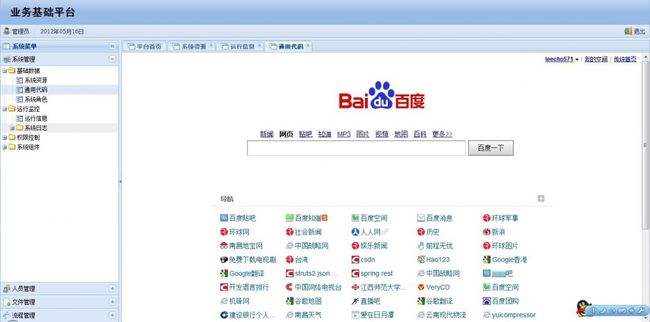
这里有几个要注意的地方:
- 创建组件并添加后必须调用tab组件的setActiveTab方法来激活组件,让其显示出来
- Ext.create('class')方法,如果有定义这个class,Ext会直接创建,如果没有Ext会通过配置的动态加载的规则进行加载
- 如果要调用node.data里面的属性,一定要在store使用的model里面进行定义,否则就是一个undefined
至此,这个平台都搭建就讲完了,文采不好,希望大家海涵!!
http://download.csdn.net/detail/leecho571/4307693 实例下载,里面有个app.sql的数据库文件,用mysql数据库导入即可
看文章评论一下是美德,你的评论是我最大的动力!!期待你的意见!!
- 顶
- 46
- 踩
- 2
- 上一篇Ext4+Servlet+HTML5实现实时获取文件上传进度、本地预览、文件拖拽上传的相册实例
- 下一篇Ext.form.field.ComboBox结合Servlet、JSON实现AutoComplete