
Android开机动画
转自:http://blog.csdn.net/mlbcday/article/details/7410509
Android开机动画有两种修改方法,android 2.0及之后,使用bootanimation程序显示开机画面,如需修改开机画面,不用修改代码,只需按格式要求做bootanimation.zip包,放在系统的/system/media目录中,或/data/local目录中即可,两个目录下都存在时,优先使用/data/local下的。android 2.0之前,则需要修改源码。
开机画面主要是由一个zip格式的压缩包bootanimation.zip组成,压缩包里面包含数张png格式的图片,还有一个desc.txt的文本文档,开机时按desc.txt里面的指令,屏幕上会按文件名称顺序连续的播放一张张的图片,就像播放原始的胶带影片一样,形成动画。
(1)动画图片制作。由于缺少横屏动画的源文件,本例采取的是使用屏幕录像软件录制android模拟器中的横屏开机动画(如屏幕录像专家V2011),然后在媒体播放器中捕获每一帧(如KMPlayer),保存为PNG格式的图片。这两个软件的使用方法比较简单,可参考网上的使用说明。 根据个人喜好,如果替换成别的动画方法也类似,如用flash制作好自己想要的动画,按帧导出,然后按数字顺序给文件编号就可以了。
图片按照数字编号后统一放在一个文件夹下,本例中为part0。如下图:
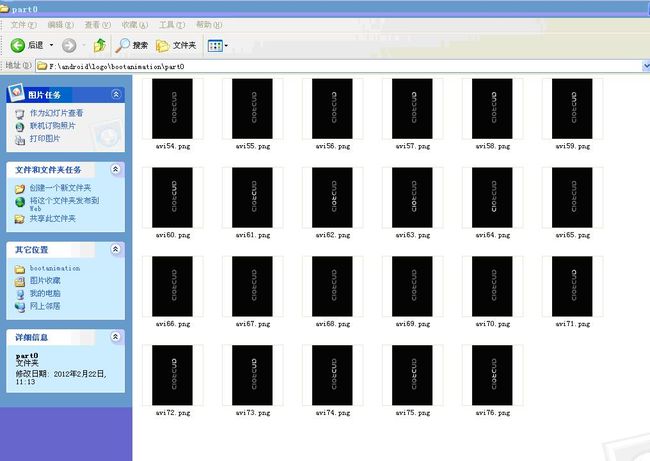
android平台默认竖屏扫描图片,所以在这里需要把图片顺时针旋转一次。
(2)动画属性描述文件。desc.txt是一个保存形式为ANSI格式的文件,用于设置这个动画像素(大小),帧数,闪烁次数,文件夹名称等。内容如下:480 427 30
p 1 0 part0
p 0 0 part1
480 427 30 ---这里的480代表图片的像素(大小)宽度,427代表图片的像素(大小)高度,30代表帧数;
p 1 0 part0 ---这里的p代表标志符,1代表循环次数为1次,0代表阶段间隔时间为0,part0代表对应的文件夹名,为第一阶段动画图片目录;
p 0 0 part1---这里的p代表标志符,0代表本阶段无限循环,0代表阶段间隔时间为0,part1代表对应的文件夹名,为第二阶段动画图片目录;
part0和part1文件夹内包含的是两个动画的系列图片,图片为PNG格式。系列图片文件的加载刷新按文件名的名称排序。必须注意的是,在属性描述完成后要有换行符(回车跳入下一行),已确保指令都已完成。
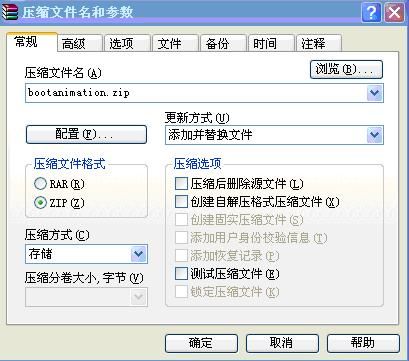
(3)图片和desc.txt文档都准备好后,开始打包为bootanimation.zip。选中图片文件夹part0和desc.txt(提醒一下:打包前将图片文件夹中的Thumbs.db删除),然后右键选择WINRAR的"添加到压缩文件"进入自定义压缩文件设置:压缩文件格式选择:ZIP,压缩方式选择:存储,然后点击确定即可。
---
使用代码拷贝到/data/local目录时,需要修改读写权限
	private int execCommand(boolean isRoot, ArrayList<String> commands) {
		if (Utils.isEmpty(commands)) {
			return 0;
		}
		int result = 0;
		Process process = null;
		BufferedReader successResult = null;
		BufferedReader errorResult = null;
		StringBuilder successMsg = null;
		StringBuilder errorMsg = null;

		DataOutputStream os = null;
		try {
			process = Runtime.getRuntime().exec(
					isRoot ? COMMAND_SU : COMMAND_SH);
			os = new DataOutputStream(process.getOutputStream());
			for (String command : commands) {
				if (command == null) {
					continue;
				}
				os.writeBytes(command + "\n");
			}

			os.writeBytes("exit\n");
			os.flush();

			result = process.waitFor();
			// get command result
			successMsg = new StringBuilder();
			errorMsg = new StringBuilder();
			successResult = new BufferedReader(new InputStreamReader(
					process.getInputStream()));
			errorResult = new BufferedReader(new InputStreamReader(
					process.getErrorStream()));
			String s;
			while ((s = successResult.readLine()) != null) {
				successMsg.append(s);
			}
			while ((s = errorResult.readLine()) != null) {
				errorMsg.append(s);
			}
		} catch (IOException e) {
			e.printStackTrace();
		} catch (Exception e) {
			e.printStackTrace();
		} finally {
			try {
				if (os != null) {
					os.close();
				}
				if (successResult != null) {
					successResult.close();
				}
				if (errorResult != null) {
					errorResult.close();
				}
				if (process != null) {
					process.destroy();
				}
			} catch (Exception e) {
				e.printStackTrace();
			}

		}
		if (successMsg.length() > 0) {
			result = 0;
		}
		if (errorMsg.length() > 0) {
			result = -1;
		}
		Log.v("tag", "execCommand.result=" + result + ", successMsg="
				+ successMsg.toString() + "\nerrorMsg=" + errorMsg.toString());
		return result;
	}

	@Override
	protected Object doInBackground(Object... params) {
		if (appUpgrade || !FileUtils.isExist("/sdcard/test/test.apk")) {
			boolean success = FileUtils.copyFileToLocal(R.raw.test,
					"/sdcard/test/", "test.apk");
			if (success) {
				Config.setAppVersion(MainActivity.APP_VERSION);
			}
		}
		ArrayList<String> commands = new ArrayList<String>();
		if (bootUpgrade) {
			FileUtils.copyFileToLocal(R.raw.bootanimation, "/sdcard/test/",
					"bootanimation.zip");
			commands.clear();
			// commands.add("mount -o remount,rw /system");
			commands.add("cp /sdcard/test/bootanimation.zip /data/local/");
			commands.add("chmod 777 /data/local/bootanimation.zip");
			int result = execCommand(true, commands);
			if (result != -1) {
				Config.setBootVersion(MainActivity.BOOT_VERSION);
			}
			commands.clear();
			commands.add("mount -o remount,rw /system");
			commands.add("rm /system/app/Launcher2.apk /system/app/PndLauncher.apk /system/app/dongle_launcher.*");
			execCommand(true, commands);
		}

		if (params != null) {
			commands.clear();
			for (Object obj : params) {
				String command = (String) obj;
				commands.add(command);
			}
			execCommand(true, commands);
		}
		return null;
	}