
NIO-Channel详解
NIO-Channel详解
1.Channel概述
Channel即通道,表示打开IO设备的连接,⽐如打开到⽂件、Socket套接字的连接。在使⽤NIO时,必须要获取⽤于连接IO设备的通道以及⽤于容纳数据的缓冲区。通过操作缓冲区,实现对数据的处理。也就是说数据是保存在buffer缓冲区中的,需要通过Channel来操作缓冲区中的数据。
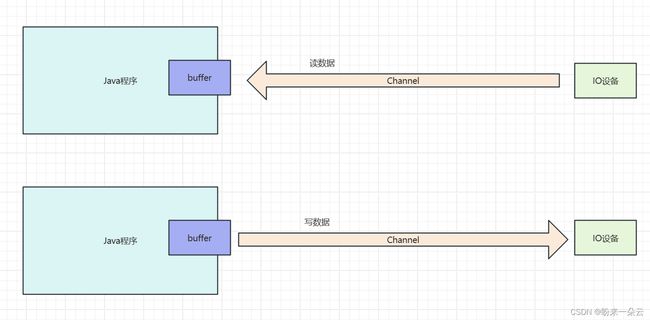
Channel相⽐IO流中的Stream更加⾼效,可以异步双向传输。
Channel的主要实现类有以下⼏个:
-
FileChannel:读写⽂件的通道
-
SocketChannel:读写TCP⽹络数据的通道
-
ServerSocketChannel:像web服务器⼀样,监听新进来的TCP连接,为连接创建SocketChannel
-
DatagramChannel:读写UDP⽹络数据的通道
2.FileChannel详解
FileChannel介绍
⽤于读取、写⼊、映射和操作⽂件的通道。⽂件通道是连接到⽂件的可搜索字节通道。它在其⽂件中有⼀个当前位置,可以查询和修改。⽂件本身包含可变⻓度的字节序列,可以读取和写⼊,并且可以查询其当前⼤⼩。当写⼊的字节超过其当前⼤⼩时,⽂件的⼤⼩增加;⽂件被截断时,其⼤⼩会减⼩。⽂件还可能具有⼀些相关联的元数据,如访问权限、内容类型和上次修改时间;此类不定义元数据访问的⽅法。
除了熟悉的字节通道读、写和关闭操作外,此类还定义了以下⽂件特定操作:
-
字节可以以不影响通道当前位置的⽅式在⽂件中的绝对位置读取或写⼊。
-
⽂件的区域可以直接映射到存储器中;对于⼤型⽂件,这⽐调⽤通常的读或写⽅法更有效。
-
对⽂件进⾏的更新可能会被强制输出到底层存储设备,以确保在系统崩溃时数据不会丢失。
-
字节可以从⼀个⽂件传输到另⼀个通道,反之亦然,许多操作系统都可以将其优化为直接从⽂件系统缓存进⾏⾮常快速的传输。
-
⽂件的⼀个区域可以被锁定以防⽌其他程序访问。
多个并发线程使⽤⽂件通道是安全的。根据通道接⼝的指定,可以随时调⽤close⽅法。在任何给定时间,只有⼀个涉及通道位置或可以改变其⽂件⼤⼩的操作正在进⾏;在第⼀个操作仍在进⾏时尝试发起第⼆个这样的操作将被阻⽌,直到第⼀个操作完成。其他⾏动,特别是采取明确⽴场的⾏动,可以同时进⾏;它们是否真的这样做取决于底层实现,因此没有具体说明。
FileChannel实例
-
FileChannel读文件
package com.my.io.channel.file; import java.io.FileNotFoundException; import java.io.IOException; import java.io.RandomAccessFile; import java.nio.ByteBuffer; import java.nio.channels.FileChannel; /** * @author zhupanlin * @version 1.0 * @description: FileChannel 读文件 * @date 2024/1/25 10:09 */ public class Demo1 { public static void main(String[] args) throws IOException { // 随机访问流 RandomAccessFile file = new RandomAccessFile("1.txt", "rw"); // 得到FileChannel FileChannel fileChannel = file.getChannel(); // 创建Buffer ByteBuffer buffer = ByteBuffer.allocate(1024); // 通过fileChannel读取数据到buffer中 int len = 0; while ((len = fileChannel.read(buffer)) != -1){ // 在当前的Java程序中把buffer中的数据显示出来 // 把写的模式转换成读的模式 buffer.flip(); // 读buffer中的数据 while (buffer.hasRemaining()){ // 获得buffer中的数据 byte b = buffer.get(); System.out.print(((char) b)); } // buffer清除 buffer.clear(); } file.close(); } } -
FileChannel写数据
package com.my.io.channel.file; import java.io.FileNotFoundException; import java.io.IOException; import java.io.RandomAccessFile; import java.nio.ByteBuffer; import java.nio.channels.FileChannel; /** * @author zhupanlin * @version 1.0 * @description: FileChannel写数据 * @date 2024/1/25 10:24 */ public class Demo2 { public static void main(String[] args) throws IOException { // 创建随机访问流 RandomAccessFile file = new RandomAccessFile("2.txt", "rw"); // 获得FileChannel FileChannel fileChannel = file.getChannel(); // 创建buffer对象 ByteBuffer buffer = ByteBuffer.allocate(1024); // 数据 String data = "hello file channel"; // 存入buffer buffer.put(data.getBytes()); // 翻转buffer,position->0,limit->最大的位置 buffer.flip(); // fileChannel 写数据到文件 fileChannel.write(buffer); // 关闭 fileChannel.close(); file.close(); } }
-
通道之间传输数据一
package com.my.io.channel.file; import java.io.FileNotFoundException; import java.io.IOException; import java.io.RandomAccessFile; import java.nio.channels.FileChannel; /** * @author zhupanlin * @version 1.0 * @description: 通道间的数据传输 * @date 2024/1/25 10:34 */ public class Demo3 { public static void main(String[] args) throws IOException { // 创建两个channel RandomAccessFile srcFile = new RandomAccessFile("1.txt", "rw"); FileChannel srcfileChannel = srcFile.getChannel(); RandomAccessFile destFile = new RandomAccessFile("3.txt", "rw"); FileChannel destFileChannel = destFile.getChannel(); // src -> dest destFileChannel.transferFrom(srcfileChannel, 0,srcfileChannel.size()); // 关闭 srcfileChannel.close(); destFileChannel.close(); System.out.println("传输完成"); } }
-
通道之间传输数据二
package com.my.io.channel.file; import java.io.FileNotFoundException; import java.io.IOException; import java.io.RandomAccessFile; import java.nio.channels.FileChannel; import java.util.Random; /** * @author zhupanlin * @version 1.0 * @description: 通道之间数据传输 * @date 2024/1/25 10:39 */ public class Demo4 { public static void main(String[] args) throws IOException { // 获得两个文件的channel RandomAccessFile srcFile = new RandomAccessFile("1.txt", "rw"); FileChannel srcFileChannel = srcFile.getChannel(); RandomAccessFile destFile = new RandomAccessFile("4.txt", "rw"); FileChannel destFileChannel = destFile.getChannel(); // src -> dest srcFileChannel.transferTo(0, srcFileChannel.size(), destFileChannel); // 关闭 srcFileChannel.close(); destFileChannel.close(); } }
3.Socket通道介绍
⾯向流的连接通道。Socket通道⽤于管理socket和socket之间的通道。Socket通道具有以下特点:
-
可以实现⾮阻塞,⼀个线程可以同时管理多个Socket连接,提升系统的吞吐量。
-
Socket通道的实现类(DatagramChannel、SocketChannel和ServerSocketChannel)在被实例化时会创建⼀个对等的Socket对象,也可以从Socket对象中通过getChannel()⽅法获得对应的Channel。
4.ServerSocketChannel详解
ServerSocketChannel是⼀个基于通道的Socket监听器,能够实现⾮阻塞模式。
ServerSocketChannel的主要作⽤是⽤来监听端⼝的连接,来创建SocketChannel。也就是说,可以调⽤ServerSocketChannel的accept⽅法,来创建SocketChannel对象。
示例
package com.my.io.channel.socket;
import java.io.IOException;
import java.net.InetSocketAddress;
import java.nio.channels.ServerSocketChannel;
import java.nio.channels.SocketChannel;
/**
* @author zhupanlin
* @version 1.0
* @description: ServerSocketChannel
* @date 2024/1/25 11:04
*/
public class ServerSocketChannelDemo {
public static void main(String[] args) throws IOException {
// 创建出ServerSocketChannel
ServerSocketChannel ssc = ServerSocketChannel.open();
// 绑定端口
ssc.socket().bind(new InetSocketAddress(9090));;
// 设置成非阻塞的模式
//ssc.configureBlocking(false);
// 监听客户端连接
while (true){
System.out.println("等待连接...");
// 当有客户端连接上来,则创建出SocketChannel对象
SocketChannel socketChannel = ssc.accept();
if (socketChannel != null){
System.out.println(socketChannel.socket().getRemoteSocketAddress() + "已连接");
}else {
System.out.println("继续等待");
try {
Thread.sleep(2000);
} catch (InterruptedException e) {
e.printStackTrace();
}
}
}
}
}
5.SocketChannel详解
SocketChannel介绍
SocketChannel是连接到TCP⽹络套接字的通道,更多代表的是客户端的操作。
SocketChannel具有以下特点:
-
SocketChannel连接的是Socket套接字,也就是说通道的两边是Socket套接字
-
SocketChannel是⽤来处理⽹络IO的通道
-
SocketChannel是可选择的,可以被多路复⽤
-
SocketChannel基于TCP连接传输
SocketChannel使⽤细节
SocketChannel在使⽤上需要注意以下细节:
-
不能在已经存在的Socket上再创建SocketChannel
-
SocketChannel需要指明关联的服务器地址及端⼝后才能使⽤
-
未进⾏连接的SocketChannel进⾏IO操作时将抛出NotYetConnectedException异常
-
SocketChannel⽀持阻塞和⾮阻塞两种模式
-
SocketChannel⽀持异步关闭。
-
SocketChannel⽀持设定参数
| 参数名称 | Description |
|---|---|
| SO_SNDBUF | Socket发送缓冲区的大小 |
| SO_RCVBUF | Socket接收缓冲区的大小 |
| SO_KEEPALIVE | 保活连接 |
| SO_REUSEADDR | 复用地址 |
| SO_LINGER | 有数据传输时延缓关闭Channel |
| TCP——NODELAY | 禁用Nagle算法 |
SocketChannel示例
-
创建SocketChannel,同时会去连接服务端
-
方式一
SocketChannel socketChannel = SocketChannel.open(new InetSocketAddress("localhost", 9090)); -
方式二
SocketChannel socketChannel = SocketChannel.open();
socketChannel.connect(new InetSocketAddress("localhost", 9090));
-
-
连接状态校验
-
socketChannel.isOpen(): 判断SocketChannel是否为open状态
-
socketChannel.isConnected(): 判断SocketChannel是否已连接
-
socketChannel.isConnectionPending(): 判断SocketChannel是否正在进⾏连接
-
socketChannel.finishConnect(): 完成连接,如果此通道已连接,则此⽅法将不会阻塞,并将⽴即返回true。如果此通道处于⾮阻塞模式,则如果连接过程尚未完成,则此⽅法将返回false。如果此通道处于阻塞模式,则此⽅法将阻塞,直到连接完成或失败,并且将始终返回true或抛出⼀个描述失败的检查异常。
-
-
阻塞与非阻塞
//设置⾮阻塞
socketChannel.configureBlocking(false);
-
读写操作
package com.my.io.channel.socket; import java.io.IOException; import java.net.InetSocketAddress; import java.net.StandardSocketOptions; import java.nio.ByteBuffer; import java.nio.channels.SocketChannel; /** * @author zhupanlin * @version 1.0 * @description: 使用SocketChannel * @date 2024/1/25 11:40 */ public class SocketChannelDemo2 { public static void main(String[] args) throws IOException { // 获得SocketChannel SocketChannel socketChannel = SocketChannel.open(new InetSocketAddress("www.baidu.com", 80)); // 设置成非阻塞的模式 socketChannel.configureBlocking(false); // 设置接收缓冲区的大小 socketChannel.setOption(StandardSocketOptions.SO_RCVBUF, 1024); // 设置发送缓冲区的大小 socketChannel.setOption(StandardSocketOptions.SO_SNDBUF, 2048); System.out.println("socketChannel.getOption(StandardSocketOptions.SO_SNDBUF) = " + socketChannel.getOption(StandardSocketOptions.SO_SNDBUF)); // 判断socket是否正在连接,如果正在连接,就让他连接成功 if (socketChannel.isConnectionPending()){ socketChannel.finishConnect(); } ByteBuffer buffer = ByteBuffer.allocate(1024); int len = socketChannel.read(buffer); if (len == 0){ System.out.println("没有读到数据!"); }else if (len == -1){ System.out.println("数据读完了"); } else{ System.out.println("读取到内容:" + new String(buffer.array(), 0, len)); } socketChannel.close(); } }
6.DatagramChannel详解
DatagramChannel对象关联着⼀个DatagramSocket对象。
DatagramChannel基于UDP⽆连接协议,每个数据报都是⼀个⾃包含的实体,拥有它⾃⼰的⽬的地址及数据负载。DatagramChannel可以发送单独的数据报给不同的⽬的地,同样也可以接受来⾃于任意地址的数据报。
-
示例一
@Test
    public void testSend() throws IOException {
        // 获得DatagramChannel
        DatagramChannel datagramChannel = DatagramChannel.open();
        // 创建地址对象
        InetSocketAddress socketAddress = new InetSocketAddress("localhost", 9001);
        // 创建Buffer对象,Buffer里面需要有数据
        /*ByteBuffer buffer = ByteBuffer.allocate(1024);
        buffer.put("hello datagram".getBytes());
        buffer.flip();*/
        ByteBuffer buffer = ByteBuffer.wrap("hello datagram".getBytes());
        // 发送消息
        datagramChannel.send(buffer, socketAddress);
    }

    @Test
    public void testReceive() throws IOException {
        // 获得DatagramChannel
        DatagramChannel datagramChannel = DatagramChannel.open();
        // 创建一个描述端口的地址对象
        InetSocketAddress socketAddress = new InetSocketAddress(9001);
        // 绑定端口到channel上
        datagramChannel.bind(socketAddress);
        // 接收消息并解析
        ByteBuffer buffer = ByteBuffer.allocate(1024);
        while (true){
            // 清空buffer
            buffer.clear();
            // 接收数据并获得当前数据来自于哪里的地址对象
            SocketAddress address = datagramChannel.receive(buffer);
            // 反转buffer
            buffer.flip();
            // 解析
            System.out.println(address.toString() + "发来的消息" + new String(buffer.array(), 0, buffer.limit()));
        }
    }
-
使用read和write来表示接收和发送
DatagramChannel并不会建立连接通道,这里的read和write方法是在缓冲区中进行读写,来表达发送和接收的动作。
@Test
    public void testReadAndWrite() throws IOException {
        // 获得DatagramChannel
        DatagramChannel datagramChannel = DatagramChannel.open();
        // 绑定 端口,接收消息
        datagramChannel.bind(new InetSocketAddress(9002));
        // 连接 表明消息到达的ip和端口
        datagramChannel.connect(new InetSocketAddress("localhost", 9002));
        // write
        ByteBuffer byteBuffer = ByteBuffer.wrap("hello read and write".getBytes());
        datagramChannel.write(byteBuffer);
        // read
        ByteBuffer buffer = ByteBuffer.allocate(1024);
        while (true){
            buffer.clear();
            datagramChannel.read(buffer);
            buffer.flip();
            System.out.println("收到的消息:" + new String(buffer.array(), 0, buffer.limit()));
        }
    }
7.分散和聚集
Java NIO的分散Scatter和聚集Gather允许⽤户通过channel⼀次读取到的数据存⼊到多个buffer中,或者⼀次将多个buffer中的数据写⼊到⼀个Channel中。分散和聚集的应⽤场景可以是将数据的多个部分存放在不同的buffer中来进⾏读写

-
分散Scatter
在一个channel中读取的数据存入到多个buffer中
package com.my.io.channel.scatterandgather;
import java.io.FileNotFoundException;
import java.io.IOException;
import java.io.RandomAccessFile;
import java.nio.ByteBuffer;
import java.nio.channels.FileChannel;
/**
* @author zhupanlin
* @version 1.0
* @description: 分散
* @date 2024/1/25 14:28
*/
public class ScatterDemo {
public static void main(String[] args) throws IOException {
// 随机访问流
RandomAccessFile file = new RandomAccessFile("1.txt", "rw");
// 得到FileChannel
FileChannel fileChannel = file.getChannel();
// 创建两个buffer
ByteBuffer buffer1 = ByteBuffer.allocate(5);
ByteBuffer buffer2 = ByteBuffer.allocate(1024);
// channel读文件中的数据写入到buffer中
ByteBuffer[] byteBuffers = new ByteBuffer[]{buffer1, buffer2};
long len = 0;
while ((len = fileChannel.read(byteBuffers)) != -1){
}
// 打印出两个buffer中的数据
buffer1.flip();
buffer2.flip();
System.out.println("buffer1:" + new String(buffer1.array(), 0, buffer1.limit()));
System.out.println("buffer2:" + new String(buffer2.array(), 0, buffer2.limit()));
fileChannel.close();
}
}
-
聚集
一次将多个buffer中的数据写入到一个channel中
package com.my.io.channel.scatterandgather;
import java.io.IOException;
import java.io.RandomAccessFile;
import java.nio.ByteBuffer;
import java.nio.channels.FileChannel;
/**
* @author zhupanlin
* @version 1.0
* @description: 聚集
* @date 2024/1/25 14:48
*/
public class GatherDemo {
public static void main(String[] args) throws IOException {
// 创建随机访问流
RandomAccessFile file = new RandomAccessFile("6.txt", "rw");
// 得到fileChannel
FileChannel fileChannel = file.getChannel();
// 创建两个buffer对象
ByteBuffer buffer1 = ByteBuffer.allocate(1024);
ByteBuffer buffer2 = ByteBuffer.allocate(1024);
// 存入数据到buffer1
String data1 = "hello buffer1";
buffer1.put(data1.getBytes());
buffer1.flip();
// 存入数据到buffer2
String data2 = "hello buffer2";
buffer2.put(data2.getBytes());
buffer2.flip();
// channel写数据
fileChannel.write(new ByteBuffer[]{buffer1, buffer2});
// 关闭file流
fileChannel.close();
}
}